GL Computing


Sage ACT! | ACT! 5/6 | ACT! for Lotus Notes  
Life and Times with ACT! - GL Computing Blog RSS resellers | contact | home

Blog Twitter Facebook


ACT! by Sage PRODUCT INFORMATION


  ACT! by Sage 2007 (9.0)
 
  ACT! by Sage 2008 (10.0)
 
  ACT! by Sage 2009 (11.0)
 
  ACT! by Sage 2010 (12.0)
 
  Sage ACT! 2011 Pro
 
  Sage ACT! 2012 Pro
 
  ACT! Premium
 
  ACT! Premium for Web


  Accounts Master! - Linking ACT! to QuickBooks
 
  Handheld Contact - The leading mobile solution for Sage ACT!
 
  itTables - Custom Tables and Relationships
 
  itDial (TAPI) - CTI link ACT! to TAPI phones and Skype
 
  itOutreach - Quickly and easily send emails from ACT!
 
  itFetch - Create contacts from e-mails
 
  itImport - Import/Merge data into ACT! by Sage
 
  itExport - Export data from ACT!
 
  itScan - scan business cards directly into ACT!
 
  itService - Automatically run CRMAddon tools
 
  Telesupport Helpdesk 4.0
 
  AutoAdmin
 
  MergeAdmin
 
  MigrateAdmin
 
  FaxAdmin
 
  DocAdmin
 
 
Handheld Contact - The leading mobile solution for Sage ACT!
 Brochure  FAQ


Handheld Contact - The leading mobile solution for Sage ACT!
  • Get your ACT! Data updated wirelessly to your smartphone
  • Manage which Groups of Contacts are sent plus any you have Activities scheduled with
  • No requirement to come back into the office to cradle sync
  • Comparison of all the ways to Get ACT! on your phone
  • Blackberry Professional Video
  • iPhone Professional Video
  • iPad Professional Video
  • Windows Mobile Basic Video
  •  

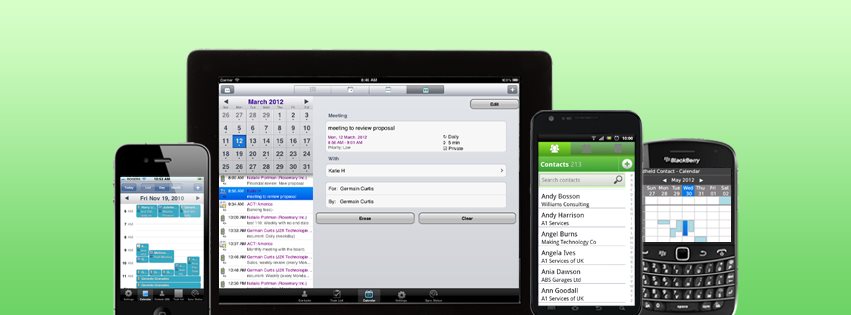
    Use ACT! on the go. Wirelessly sync, anywhere.

    Handheld Contact Professional Images

    Definitive Mobile Solution for ACT!

    Powerful ACT! Features

    • Simple setup.
    • Customize each user's experience.
    • No duplicate creation issues
    • Automatic, wireless syncing keeps data on the mobile device up to date.
    • The only solution designed for ACT! and respects relationships between contacts, notes, histories, and activities.
    • Help maintain a high level of data integrity.
    • Manage one or many users from a single desktop application on a computer, server, or laptop.
    • Customize which standard and custom fields sync.
    • Create and manage contacts, activities, notes, and more.
    • History is automatically created after a call is placed or an e-mail or text message is sent.
    • Makes scheduling a follow up after a phone call or e-mail hassle-free.
    • Clear activities and schedule follow ups for one or many people.
    • Quickly place calls and send e-mails directly from activity records.
    • View and edit other ACT! users' activities.

    Australian Pricing (for other regions, please contact GL Computing):

    One subscription provides one user with:
    • Unlimited data syncing
    • Free installation and setup
    • Unlimited quality support
    • Free software upgrades

    Professional
    Annual Subscription
    $99.00
    Blackberry, iPhone, iPad, Android and Windows Mobile 5/6

    Basic
    Annual Subscription
    $99.00
    Blackberry and Windows Mobile only

      Compare Editions

    Try Handheld Contact to see how it increases your productivity; saves you time and money; and lets you get the most out of ACT!.

    Compatible smartphones and devices

    • Apple iPhone, Apple iPad, Apple iPod Touch - iOS4.2 and later
    • Android OS 2.2 and later
    • BlackBerry Smartphones OS 6/7
    • Windows Mobile 5.0, 6.0, 6.1 and 6.5 Pocket PCs with a touch screen.

    An internet connection through a carrier or Wi-Fi is required.

    Compatible versions of ACT!

    ACT! 2005 -2012 Pro, Premium and Web, ACT! for Financial Professionals, and ACT! for Real Estate..

    Compatible computer operating systems

    Windows 7, Windows 2008 RC, Windows Vista, Windows XP Professional, Windows XP Media Centre Edition, Windows 2008 Server, Windows 2003 Server,


    Copyright © 1997-2013 GL Computing